How a glossary helps prevent AI hallucinations
AI translation
Table of content

A glossary gives enterprise localization teams a shared terminology layer for high-quality translation at speed. For teams asking, “What is a localization glossary?”, the practical answer has changed with AI orchestration: it is the structured context that tells translators, reviewers, and AI agents how specialized terms, product language, and industry jargon should be handled across markets.
In localization and translation, terminology quality shapes user trust. A product term translated inconsistently across UI, documentation, and support content can create friction. A well-managed glossary prevents that before the software content reaches the customer.
A localization glossary, also called a term base, is a curated collection of approved terms, translations, and terminology rules. It defines how product names, UI labels, industry jargon, abbreviations, protected terms, and forbidden variants should be handled across languages.
Many localization teams use “glossary” and “term base” interchangeably. In AI-orchestrated workflows, the key point is the structure. A strong glossary explains where a term applies, which alternatives to avoid, whether the term should be translated, and why the wording matters in the product experience.
A glossary may say that “workspace” translates to “Arbeitsbereich.” A well-managed glossary adds the context: the term refers to a shared product environment (not a physical workplace); avoid alternatives such as “Arbeitsplatz” or “Büro”.
Asset | Primary role | Best used for |
|---|---|---|
Glossary/term base | Controls approved terminology | Product names, UI terms, industry jargon, forbidden terms |
Translation memory | Reuses previously approved translations | Repeated sentences, documentation, support articles |
Style guide | Defines writing and formatting rules | Tone, capitalization, punctuation, and locale conventions |
AI prompt instructions | Guides a specific translation task | Task-specific behavior, constraints, and context |
At LingoHub, we offer a diverse set of language tools to our users, like a glossary, translation memory, style guide, and labels, to reflect a useful operating principle: terminology rules, previous translations, and writing style each have their own place in the localization workflow. Glossaries are just one component of the modern translator’s toolkit; you can explore the full range of efficiency-boosting features in our deep dive into CAT tools.
💡 Pro Tip: For AI agents, forbidden terms can be especially effective because they define clear boundaries. Stating that “Büro” should never be used for “Workspace” gives the agent a concrete exclusion rule, which can prevent recurring terminology errors more reliably than simply listing the preferred translation.
AI agents rely on context to make terminology decisions. A high-quality glossary gives them approved terms, protected terms, definitions, and usage boundaries before translation begins. For a broader strategic view, see our complete guide on how to supercharge your workflow with AI localization.
For enterprises and international organizations, glossary quality directly affects consistency, speed, and review effort. A weak glossary may still produce fluent translations, but fluency alone does not guarantee the right terminology. In specialized industries, the correct term often carries legal, technical, medical, or product-specific meaning.
The English word “case” can carry different meanings depending on context.
Context | Likely meaning |
|---|---|
Legal software | A legal matter or proceeding |
Customer support | A support ticket |
Healthcare | A patient record or clinical instance |
Hardware | A physical enclosure |
An AI agent can often infer meaning from surrounding text. Still, enterprise localization should not rely on inference for high-value terms. A glossary entry with domain, definition, and example usage provides the agent with stronger guidance and reviewers with a clear reference point.
A powerful glossary helps AI agents in the following ways:
Resolve ambiguity faster
Preserve product and brand language
Apply industry jargon consistently
Avoid forbidden or outdated translations
Protect terms that should remain untranslated
Reduce repeated reviewer corrections
For professional localization teams, this turns the glossary into a dynamic asset rather than a static reference file.
A localization glossary should include terms that require control. The goal is to identify terminology that could lead to inconsistency, ambiguity, or mistranslation, affecting quality, trust, compliance, or customer understanding.
LingoHub’s glossary interface separates “Translatable terms” from “Untranslatable terms”, a valuable distinction for AI-assisted translation. Some terms need approved translations. Others need protection across languages.
Term type | AI instructions | Example |
|---|---|---|
Translatable | “Swap with approved target.” | “Workspace” → “Arbeitsbereich” |
Untranslatable | “Do NOT translate. Lock string.” | “LINA” |
Here’s an example of how you can manage glossary entries for Translatable terms in the LingoHub UI:
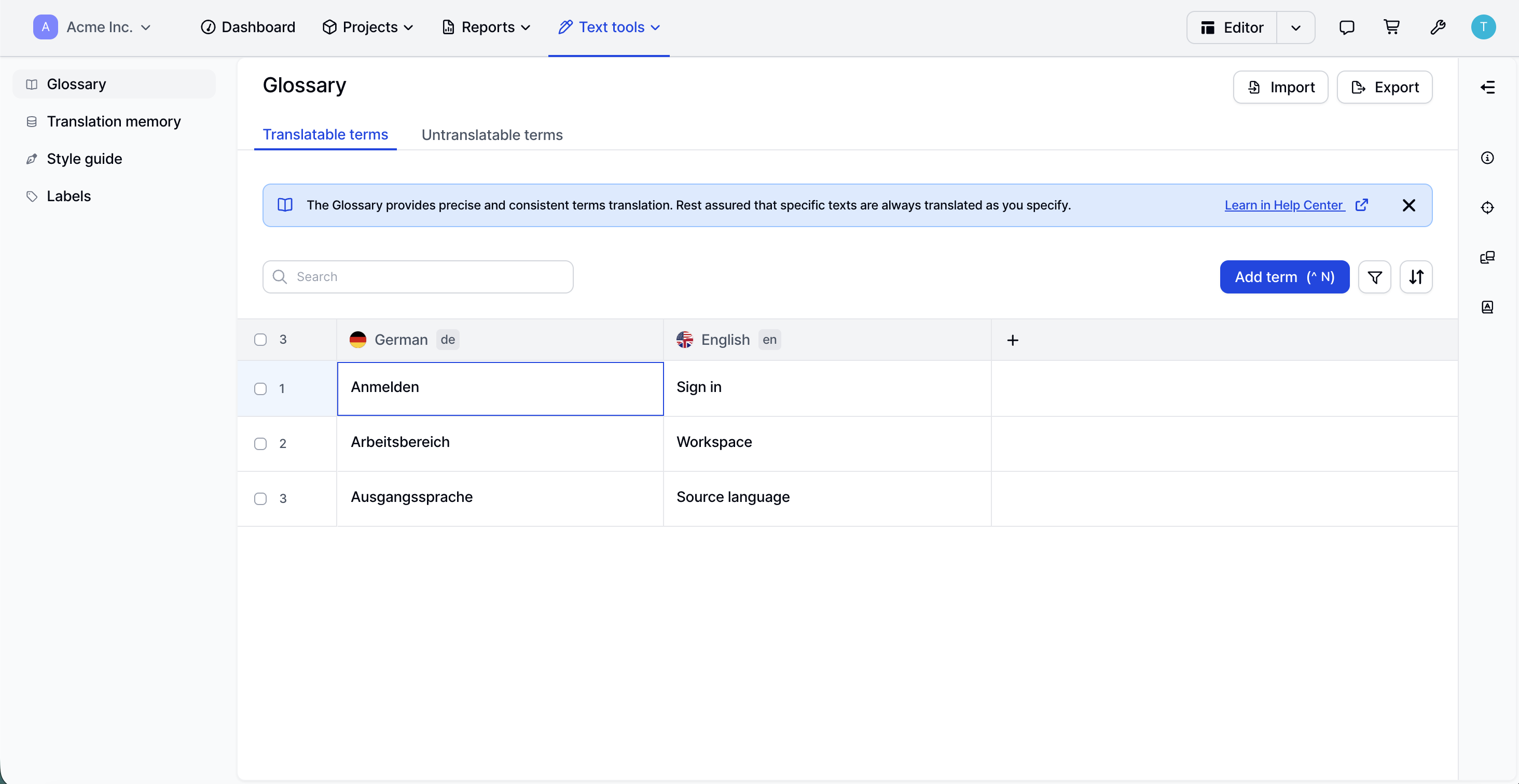
These terms shape the product experience. If “workspace” appears as multiple translations across an interface, users may interpret it as different concepts. A glossary keeps the product language coherent.
Untranslatable terms are managed within a separate tab, as follows:
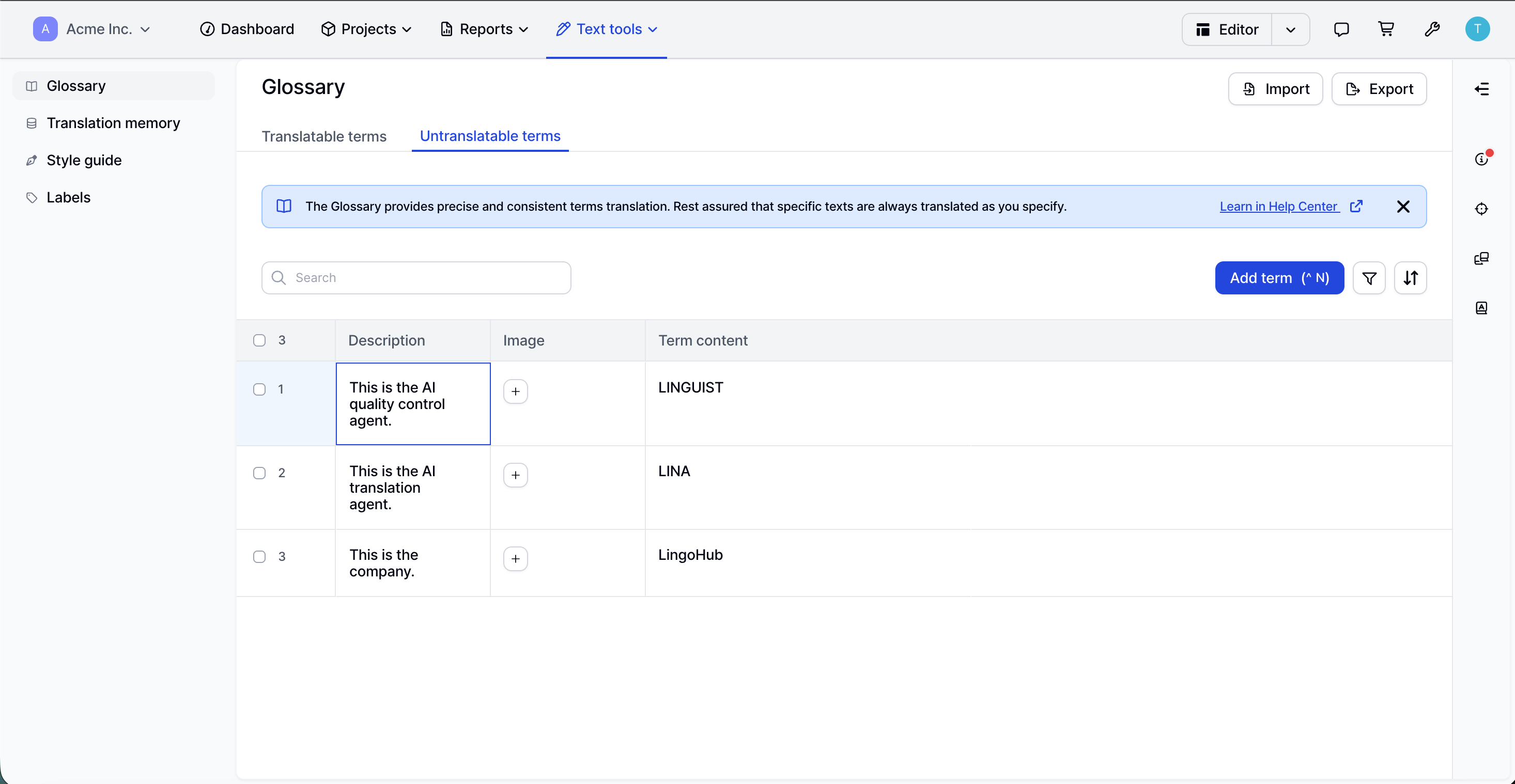
These terms need a different kind of instruction. The AI agent should preserve them rather than translate them. The description gives context so the system and the reviewer understand why the term is protected.
An AI-ready localization glossary might include these 5 categories to ensure model consistency:
Proprietary feature names
Industry jargon
Regulated legal terms
UI/Navigation labels
Brand-specific protected terms
The main rule of thumb: include a term when inconsistent translation could affect trust, usability, compliance, or brand recognition.
An AI agent needs enough context to choose terminology the same way a trained localization reviewer would. Source and target terms provide the baseline. Definitions, usage notes, examples, and domain metadata provide the decision logic.
A term pair such as “Workspace = Arbeitsbereich” gives the AI agent a translation. A context-rich entry explains that the term refers to a shared product environment where users manage localization projects, resources, and teams. That extra information reduces speculation.
Useful glossary fields include:
Field | Purpose |
|---|---|
Definition | Explains the concept behind the term |
Domain | Connects the term to an industry or business area |
Product area | Shows where the term appears |
Audience | Clarified who will read the translation |
Usage note | Explains how the term should be used |
Example sentence | Shows the term in context |
Forbidden terms | Blocks unwanted variants |
Locale-specific variant | Supports regional language differences |
Do-not-translate instruction | Protects names, tokens, and identifiers |
Approval status | Separates production-ready terms from drafts |
Owner | Assigns responsibilities |
Last reviewed date | Supports terminology governance |
LingoHub’s untranslatable glossary view demonstrates this principle through the description column. For example, “LINA” will be the LingoHub AI translation agent in LingoHub. That small context layer helps prevent the terms from being treated as ordinary words.
The same view also includes an image column. Visual context can help when terminology refers to UI elements, icons, product areas, or branded concepts. For large teams, this is especially useful because not every translator or reviewer has the same product familiarity.
Ambiguous terms need context. Product-specific language needs definitions. Abbreviations need expansion rules. Protected terms need an explicit untranslatable status.
LingoHub’s split between “Translatable terms” and “Untranslatable terms” offers a clear model. Terms such as “Sign in,” “Workspace,” and “Source language” belong in the translatable area because they need approved target-language equivalents. Terms such as “LINA,” and “LingoHub” fall into the untranslatable category because they should remain stable across locales.
Term type | Best handling |
|---|---|
Ambiguous term | Create separate entries for each meaning |
Product-specific term | Add definition, product area, and usage note |
Abbreviation | Include the full form and when to use it |
Brand name | Mark as untranslatable |
AI agent name | Mark as untranslatable with description |
UI label | Add approved translation and example sentence |
Technical identifier | Protect from translation |
In an AI localization context, “agent” could refer to an AI component, a support representative, or a software process. A glossary entry should identify the intended meaning.
Field | Example |
|---|---|
Source term | Agent |
Domain | AI orchestration |
Definition | An AI component that performs a defined localization task |
Usage note | Use when referring to automated translation or quality-control agents |
Forbidden interpretation | Human customer support representative |
This helps the AI system apply the term correctly and prevents reviewers from repeatedly resolving the same ambiguity.
A term base should operate as part of the localization workflow. It guides AI translation, supports reviewer decisions, strengthens QA checks, and keeps terminology aligned with translation memory and style guidance.
Workflow asset | Contribution |
|---|---|
Glossary/term base | Defines approved, forbidden, and protected terms |
Translation memory | Reuses previously approved sentence-level translations |
Style guide | Applies tone, formatting, and locale conventions |
Labels | Organize projects, strings, or workflows |
AI agent instructions | Tell the system how to apply available context |
QA review | Checks terminology, style, and consistency |
A sophisticated AI-assisted localization workflow can follow this sequence:
Retrieve relevant glossary terms for the project and locale.
Apply protected terms from the untranslatable list.
Retrieve translation memory matches.
Apply style guide rules.
Generate or refine the translation.
Check terminology compliance during review.
Update glossary and translation memory after approval.
This sequence protects terminology, before the system optimizes for fluent language. It also keeps humans and AI agents working from the same source of truth. Ultimately, the most reliable results come from a human-in-the-loop approach, where AI handles the heavy lifting and experts provide the final stamp of approval.
Review frequency should match the pace and risk of the terminology. Product UI terms may change with every release. Legal terms may change less frequently but require stricter review. Brand and AI product names may require immediate protection upon launch.
A glossary quietly loses value when entries age without review. Product names change, old feature labels remain active, regional language preferences evolve, and compliance wording can shift. AI agents then receive outdated instructions, which increases the effort required for reviews.
Term category | Suggested review cadence |
|---|---|
Product UI terms | Before every major release |
Fast-moving feature names | Monthly |
Marketing and campaign terms | Quarterly |
Support and help center terms | Quarterly |
Legal and compliance terms | During scheduled legal review or regulatory change |
Protected AI agent names | At launch and after naming updates |
Deprecated terms | Monthly until solved |
A glossary also needs clear ownership. Product teams should own product terminology. Legal teams should own regulated language. Marketing should own the campaign and brand terminology. Regional language teams should own locale-specific decisions.
Ownership reduces uncertainty. When a translation reviewer disputes a term, the team knows who can make the decision.
Poor AI translation quality often stems from incomplete, inconsistent, or unmanaged terminology. The model may produce fluent output, but glossary issues can lead to inconsistent product language, incorrect industry terminology, or repeated reviewer corrections.
The most common problems are practical rather than technical. Missing definitions, duplicate entries, unclear approval status, and outdated terms can all confuse AI agents and human reviewers.
Missing definitions: AI agents infer the wrong meaning
Duplicate entries: Systems receive conflicting terminology signals
No forbidden terms: Unwanted variants keep appearing
No approval status: Draft terms enter production workflows
No examples: Terms are applied in the wrong context
No locale variation: Regional language expectations are ignored
No owner: Terminology conflicts remain unresolved
No review date: Outdated entries stay active
Mixed term types: Protected names get treated like translatable words
If Workspace appears as both “Arbeitsbereich” and “Arbeitsplatz”, both translations may look plausible in isolation. In product UI, however, they signal different concepts. The glossary should specify the approved term and list alternatives as forbidden where needed.
This kind of precision matters for enterprise SaaS products because users learn the product through repeated terms. Consistency helps them build mental models faster.
A strong glossary gives enterprise localization teams a practical way to combine speed, consistency, and expert control. In AI-orchestrated translation, it acts as a shared terminology infrastructure for people and agents working across markets. For organizations with specialized jargon, that structure can make the difference between translation that merely reads well and translation that truly fits the business.
Ready to bring more control and context into your localization workflow? Book a LingoHub demo to see how your team can manage glossaries, translation memory, style guides, and AI-assisted translation in one place, or start a free trial and explore how LingoHub helps you translate specialized content with speed and consistency.
Use this checklist to turn glossary strategy into an operational workflow for AI-assisted localization.
Decide which terminology belongs in the glossary, translation memory, style guide, or AI prompt instructions.
Prioritize terms that affect trust, usability, compliance, brand recognition, or customer understanding.
Avoid filling the glossary with generic words that do not require control.
Add product names, feature names, industry jargon, legal terms, compliance language, abbreviations, and acronyms.
Add ambiguous terms when the wrong meaning could affect translation quality.
Add company names, trademarks, technical identifiers, and code-related terms as protected or untranslatable terms.
Use a simple inclusion filter: add the term if an inconsistent translation would create confusion, risk, rework, or brand inconsistency.
Require source term, target term, language pair, definition, domain, example sentence, and approval status for critical translatable terms.
Create a separate template for untranslatable terms with term content, description, protection rule, product area, and owner.
Add forbidden terms when common but incorrect variants appear during review.
Add product area and domain fields for terminology that changes meaning by context.
Add visual references for UI elements, icons, branded assets, and product-specific concepts.
Retrieve glossary terms before translation begins.
Apply protected and untranslatable terms before generating target-language output.
Use translation memory after terminology rules have been identified.
Apply style guide rules for tone, formatting, and locale conventions.
Run terminology QA after AI translation and before final approval.
Feed approved reviewer corrections back into the glossary or translation memory.
Assign owners by domain: product, legal, marketing, technical documentation, support, or regional language teams.
Review product UI terms before major releases.
Review fast-moving feature terminology monthly.
Review marketing, support, and help center terms quarterly.
Review legal and compliance terms during scheduled legal review or regulatory change.
Audit duplicates, conflicting target terms, missing definitions, missing examples, owner gaps, and stale review dates.
Use “Translatable terms” for approved language pairs, such as “Workspace” and “Arbeitsbereich.”
Use “Untranslatable terms” for protected terms such as product names, company names, and AI agent names.
Add descriptions to protected terms so AI agents and reviewers understand the context.
Use search, filtering, sorting, import, and export to keep terminology manageable at scale.
Translation memory vs. term base: The key differences
What is the difference between a translation memory and a term base? We overviewed them and how they support and affect localization.

#l10n glossary - terms all global companies should know
Learn the most common translation and localization terms. Build your localization knowledge and understand essential industry terminology.
AI localization: Supercharge your translation workflow
AI localization uses artificial intelligence to streamline translation workflows, improve quality, and scale global content faster. Learn more in our blog.
