Translate .xcstrings with AI and check every placeholder
Developer resources

Table of content

To translate xcstrings with AI, let the model translate one string at a time, then compare every placeholder with the original before the file reaches a build. Do that comparison with code: a missing %lld is easy to skim past in review, and a script finds every one.
Here’s the whole process in short:
Keep a copy of the original Localizable.xcstrings.
Pick the strings that need a translation.
Send each string with its comment and the target’s plural forms.
Write the answers back with the state needs_review.
Run the placeholder check below.
Retry each failed string once, and leave it untranslated if it fails again.
Review the needs_review strings in Xcode.
A String Catalog is the JSON file Apple introduced in Xcode 15 that holds every language of a string table in one place, and Apple says that over time it “will supersede both strings and stringsdict files”. The text inside it is full of format specifiers: %@ for an object such as a name, %lld for a whole number, %% for a literal percent sign. At runtime, String(format:) fills them in order, so a translation that loses or moves one changes what your app shows, or crashes it.
A developer who translates catalogs with an LLM put it plainly in a thread on r/iOSProgramming: pasting strings into a chat window works “until a translation drops a %@ or turns %1$@ … %2$@ into something String(format:) doesn’t like, and you find out from a crash report.”
A translation can break a catalog in six ways:
A placeholder goes missing, so the name or count never shows.
Two unnumbered placeholders of different types swap places. “%@ scored %lld points” becomes “%lld … %@”, and the app passes a name where it expects a number.
%% turns into a single %, which starts a new, broken specifier.
The model translates a substitution name, so %#@files@ becomes %#@Dateien@ and stops pointing to its plural rules.
A plural string gets English’s two forms in a language that needs four.
The model edits the key or the English source text.
JSON mode and structured outputs don’t stop any of these. Structured outputs make the reply match your schema, and the schema says that value is a string. It doesn’t say the string still has its %lld. So the JSON parses, the build passes, and the bug ships.
These steps work with ChatGPT, Claude, Gemini or any model you call through an API. They assume a catalog whose source language is English.
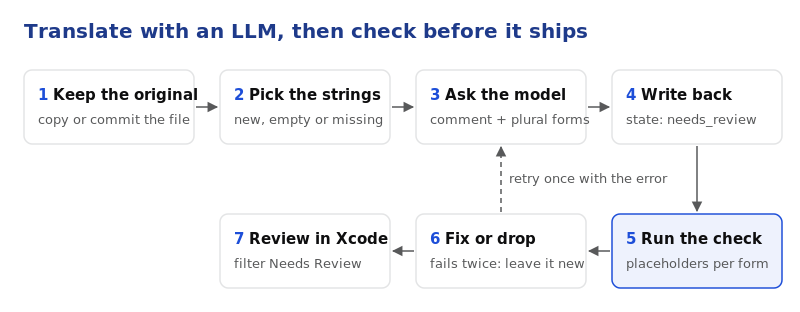
1. Keep the original. Copy Localizable.xcstrings to Localizable.before.xcstrings, or commit it first.
2. Pick the strings to translate. For each target language, take the strings that have no entry yet, an empty value, or the state “new”. Skip any string marked "shouldTranslate": false. When a string has no English entry in the file, the key itself is the English text, which is how Xcode stores many strings it extracts from code.
3. Send each string with its context. Send the source text, the comment, and for plural strings the exact forms the target needs, which are listed in the next section. One string per request costs more calls, but a mistake stays in one string. A prompt that works:
Translate this iOS app string from English into German.
Comment from the developer: {comment}
Keep every placeholder exactly as written: %@, %lld, %1$@, %%, %#@name@ and %arg.
If German word order needs the placeholders in a different order, number them (%1$@, %2$lld).
Return JSON with one key per plural form: {forms}.
Source:
{source}
4. Write the answers back as needs_review. Put each translation in its stringUnit with "state": "needs_review", not “translated”. Xcode then flags every machine translation until a person has read it.
Write the file back the way Xcode does, or every save turns into a diff of the whole catalog. Xcode uses two-space indents and puts a space on both sides of each colon. Load the catalog with Python’s json module, change the values in place, and save it like this:
with open("Localizable.xcstrings", "w", encoding="utf-8") as f:
    json.dump(catalog, f, indent=2, separators=(",", " : "), ensure_ascii=False)
    f.write("\n")
We loaded and saved the 269-string catalog from the test below this way, and got back the same bytes Xcode wrote. Your pull request then shows the new translations and nothing else.
5. Run the check. Run the script below with the original and the translated file. Done looks like “0 errors”.
6. Retry once, then stop. For each string the check reports, send it again with the error message in the prompt, for example: “Your German translation lost %@, the sender’s name. Translate it again and keep %@ and %lld.” If the second answer also fails, remove that translation, so the string stays “new”, and put it on a list for a translator.
7. Review in Xcode. Open the catalog, filter by Needs Review, and read the strings in context. Mark each one as reviewed when it’s right.
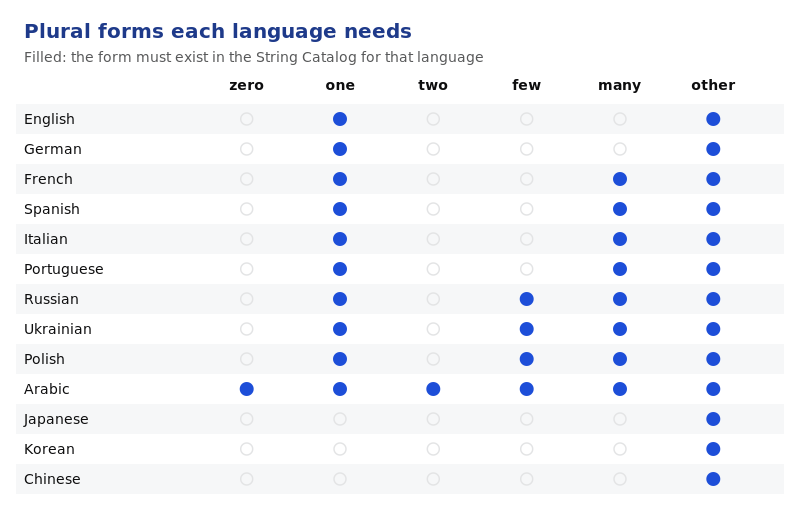
Xcode stores plurals by the categories in Unicode’s CLDR plural rules, and every language uses its own set. English and German need “one” and “other”. French, Spanish, Italian and Portuguese also have “many”, for round millions such as 1,000,000 or 2,000,000. Russian, Ukrainian and Polish need “one”, “few”, “many” and “other”. Arabic uses all six forms. Japanese, Korean and Chinese use only “other”.
The script compares the translated catalog with the original, string by string, plural form by plural form, and substitution by substitution. It uses only the Python standard library, so it runs anywhere Xcode does. The specifier pattern follows Apple’s String Format Specifiers reference, the plural sets follow CLDR 49, and we ran it with Python 3.15.
"""Compare a translated String Catalog with the original and report broken placeholders.

Usage: python3 check_xcstrings.py Localizable.before.xcstrings Localizable.xcstrings
Exits 1 when it finds an error, so it can run in CI or a pre-commit hook.
Placeholders: Apple format specifiers (%@, %d, %lld, %.1f, %1$@), Xcode 26 named ones (%(count)lld),
String Catalog substitutions (%#@files@, %arg) and %%. Plural forms: CLDR 49 cardinal categories.
"""
import json, re, sys
from collections import Counter

SPEC = re.compile(r"%#@(?P<sub>\w+)@|%arg\b|%%|%(?:(?P<pos>\d+)\$|\((?P<name>\w+)\))?[-+ #0']*\d*(?:\.\d+)?"
                  r"(?P<len>hh|h|ll|l|q|L|z|t|j)?(?P<conv>[@dDuUxXoOfFeEgGcCsSaAp])")

PLURALS = {"en": {"one", "other"}, "de": {"one", "other"}, "es": {"one", "many", "other"},
           "fr": {"one", "many", "other"}, "it": {"one", "many", "other"}, "pt-BR": {"one", "many", "other"},
           "nl": {"one", "other"}, "ru": {"one", "few", "many", "other"}, "uk": {"one", "few", "many", "other"},
           "pl": {"one", "few", "many", "other"}, "ar": {"zero", "one", "two", "few", "many", "other"},
           "ja": {"other"}, "ko": {"other"}, "zh-Hans": {"other"}, "zh-Hant": {"other"}}  # add the languages you ship

def specs(text, subs=None):
    """Placeholders in a string. Each argument gets its position, so '%@ %lld' and '%1$@ %2$lld' match,
    and a substitution like %#@files@ counts as the argument it formats (argNum 1, lld: '%1$lld')."""
    out, n = [], 0
    for m in SPEC.finditer(text):
        sub, pos, name, length, conv = m.group("sub", "pos", "name", "len", "conv")
        if sub and sub in (subs or {}): out.append(f"%{subs[sub].get('argNum')}${subs[sub].get('formatSpecifier')}")
        elif sub: out.append("%#@" + sub + "@")
        elif m.group(0) in ("%%", "%arg"): out.append(m.group(0))
        elif name: out.append("%(" + name + ")" + (length or "") + conv)
        else:
            n = int(pos) if pos else n + 1
            out.append(f"%{n}${length or ''}{conv}")
    return out

def check_text(where, src, tgt, errors, partial=False, src_subs=None, tgt_subs=None):
    s, t = specs(src, src_subs), specs(tgt, tgt_subs)
    if partial:  # a plural form like "one" may leave out the number, but nothing else
        if Counter(t) - Counter(s): errors.append(f"{where}: placeholders {t} don't match the source {s}")
    elif Counter(s) != Counter(t):
        same_types = Counter(x.split("$")[-1] for x in s) == Counter(x.split("$")[-1] for x in t)
        why = "arguments swapped (number them, like %1$@ and %2$lld, to reorder)" if same_types else "placeholders changed"
        errors.append(f"{where}: {why} {s} -> {t}")

def plural_forms(where, lang, forms, warnings):
    need = PLURALS.get(lang)
    if need is None: return
    if need - set(forms): warnings.append(f"{where}: {lang} needs plural forms {sorted(need)}, got {sorted(forms)}")

def units(entry):
    """Every stringUnit in one localization, keyed by its path: '', 'plural.one', 'device.mac', 'files.plural.few'."""
    found = {}
    def walk(node, path):
        if "stringUnit" in node: found[path] = node["stringUnit"]
        for kind, forms in node.get("variations", {}).items():
            for form, child in forms.items(): walk(child, f"{path}.{kind}.{form}".strip("."))
        for name, sub in node.get("substitutions", {}).items(): walk(sub, f"{path}.{name}".strip("."))
    walk(entry, "")
    return found

def plural_groups(entry, prefix=""):
    """Each place a string varies by plural, with the forms it has there."""
    groups = {}
    if "plural" in entry.get("variations", {}): groups[prefix or "plural"] = set(entry["variations"]["plural"])
    for name, sub in entry.get("substitutions", {}).items(): groups.update(plural_groups(sub, name))
    return groups

def main(before_path, after_path):
    before, after = json.load(open(before_path)), json.load(open(after_path))
    src_lang, errors, warnings, review = before["sourceLanguage"], [], [], Counter()
    if set(before["strings"]) != set(after["strings"]):
        errors.append(f"keys changed: missing {sorted(set(before['strings']) - set(after['strings']))[:5]}, "
                      f"added {sorted(set(after['strings']) - set(before['strings']))[:5]}")
    for key, b in before["strings"].items():
        a = after["strings"].get(key)
        if a is None or b.get("shouldTranslate") is False: continue
        source = b.get("localizations", {}).get(src_lang)
        if a.get("localizations", {}).get(src_lang) != source:
            errors.append(f"{key!r} [{src_lang}]: source text was edited")
        src_units = units(source) if source else {"": {"value": key}}  # no source entry: the key is the text
        for lang, loc in a.get("localizations", {}).items():
            if lang == src_lang: continue
            for group, forms in plural_groups(loc).items(): plural_forms(f"{key!r} [{lang}] {group}", lang, forms, warnings)
            for path, unit in units(loc).items():
                review[unit.get("state")] += 1
                base = path.rsplit(".", 1)[0] + ".other" if ".plural." in "." + path else path
                partial = ".plural." in "." + path and not path.endswith("other")
                src = (src_units.get(base) if partial else None) or src_units.get(path) or src_units.get(base) or src_units.get("") or src_units.get("plural.other")
                if src is None: continue
                check_text(f"{key!r} [{lang}] {path or 'value'}", src["value"], unit["value"], errors, partial,
                           (source or {}).get("substitutions"), loc.get("substitutions"))
    for e in errors: print("ERROR", e)
    for w in warnings: print("WARNING", w)
    print(f"{len(errors)} errors, {len(warnings)} warnings. Target states: {dict(review)}")
    return 1 if errors else 0

if __name__ == "__main__":
    sys.exit(main(*sys.argv[1:3]))
It reports each of the six breaks above as an error, except missing plural forms, which come out as warnings. Numbered placeholders such as %1$@ and %2$lld may move freely, so a numbered translation of an unnumbered source passes. Save it as check_xcstrings.py and run it as python3 check_xcstrings.py Localizable.before.xcstrings Localizable.xcstrings. It exits with 1 on any error, so it can block a commit or a CI job.
We built a small catalog with four English strings: a plural notification, a game result with two placeholders, a substitution string (“%lld files in %lld folders”) and a progress label with %%. A clean German, Russian and Japanese translation passed with 0 errors. Then we broke a copy in six ways, one for each of the six breaks listed earlier. The script reported all six:
ERROR '%@ sent you %lld photos' [en]: source text was edited
ERROR '%@ sent you %lld photos' [de] plural.other: placeholders changed ['%1$@', '%2$lld'] -> ['%1$lld']
ERROR '%@ scored %lld points' [ja] value: arguments swapped (number them, like %1$@ and %2$lld, to reorder) ['%1$@', '%2$lld'] -> ['%1$lld', '%2$@']
ERROR '%lld files in %lld folders' [de] value: placeholders changed ['%1$lld', '%2$lld'] -> ['%#@Dateien@', '%2$lld']
ERROR 'Upload %lld%% complete' [ru] value: placeholders changed ['%1$lld', '%%'] -> ['%1$lld']
WARNING '%@ sent you %lld photos' [ru] plural: ru needs plural forms ['few', 'many', 'one', 'other'], got ['one', 'other']
5 errors, 1 warnings. Target states: {'needs_review': 25}
We also ran it on a real catalog: Localizable.xcstrings from Applite, an open-source macOS app, with 269 strings in English and six other languages. It found 0 errors and 9 warnings. All 9 were French plural strings that have “one” and “other” but no “many”, so French users see the wrong grammar only at round millions.
The script can’t tell when a translation swaps two placeholders of the same type. In “%@ sent a file to %@”, both are names, so a translation that reverses who sent the file and who got it still passes. Meaning errors pass too: in one open-source catalog fix, “redacted” had been translated as “edited”, next to a malformed “%1%lld” placeholder.
So the check decides what may ship, and a person still reads what ships.
LingoHub treats .xcstrings as its own resource type and maps Xcode’s states to its own: new arrives as NEW, needs_review as TRANSLATED and translated as APPROVED. In LingoHub you don’t script the check. Quality checks flag placeholders that are missing from a translation or added to it, along with ICU syntax, tags and length limits, before a file leaves LingoHub. In the Agent role, LINA, the AI inside LingoHub, retries a segment that fails a quality check up to three times and marks it Blocked for a team member if it still fails.
LINA also translates with your glossary, translation memory and style guide. For the Xcode side of the setup, see the Apple iOS localization integration and our guide to iOS strings files, plurals and formatting.
Start your free 14-day trial or book a demo to see how LingoHub handles your String Catalogs.
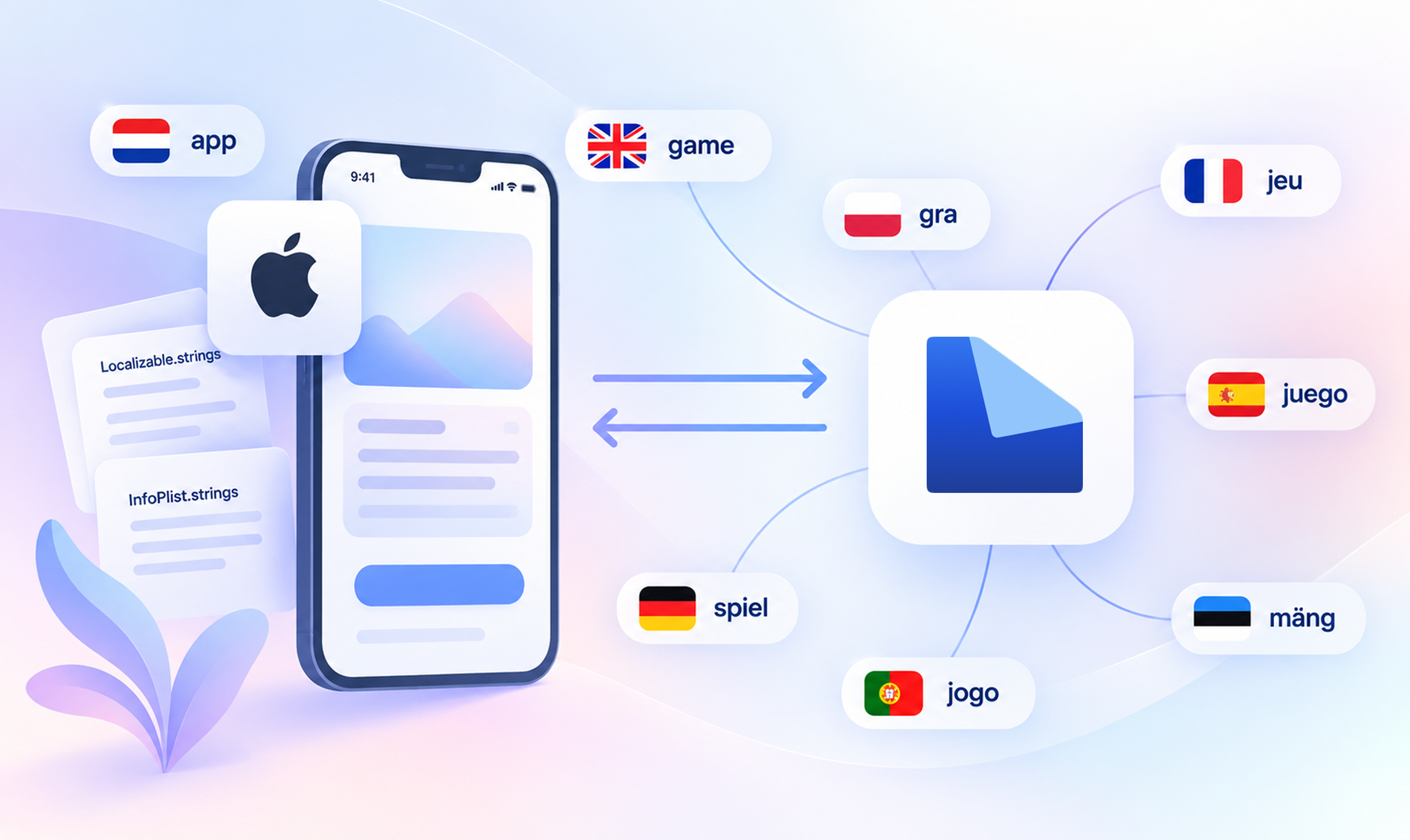
iOS localization: strings files, plurals, and formatting
How iOS localization works end to end: .strings files, .stringsdict plurals, format specifiers, FormatStyle, per-app languages, RTL, and CI checks.
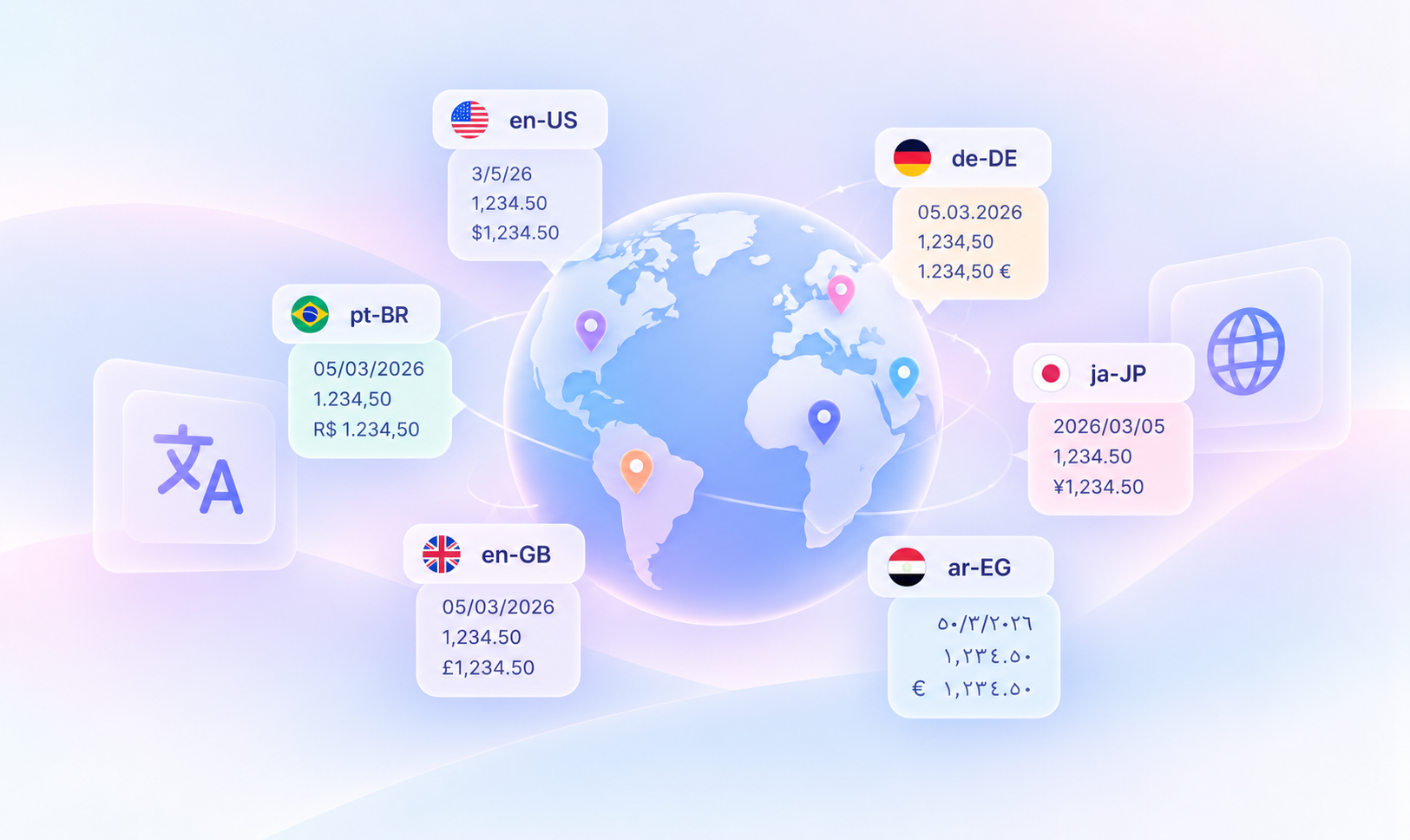
What is a locale? Codes, formats and platform differences
A locale is a language plus a region's rules for dates, numbers, currency and sorting. See one date in 8 locales and how 6 platforms write pt-BR.
i18n resource file formats: iOS .strings files
Read our blog post about localization resource file formats, focusing on .strings files used across Apple devices like iPhone and iPad. Learn more!
