Localization workflows & operations
I18n explained: Global localization for marketing teams
Localization workflows & operations
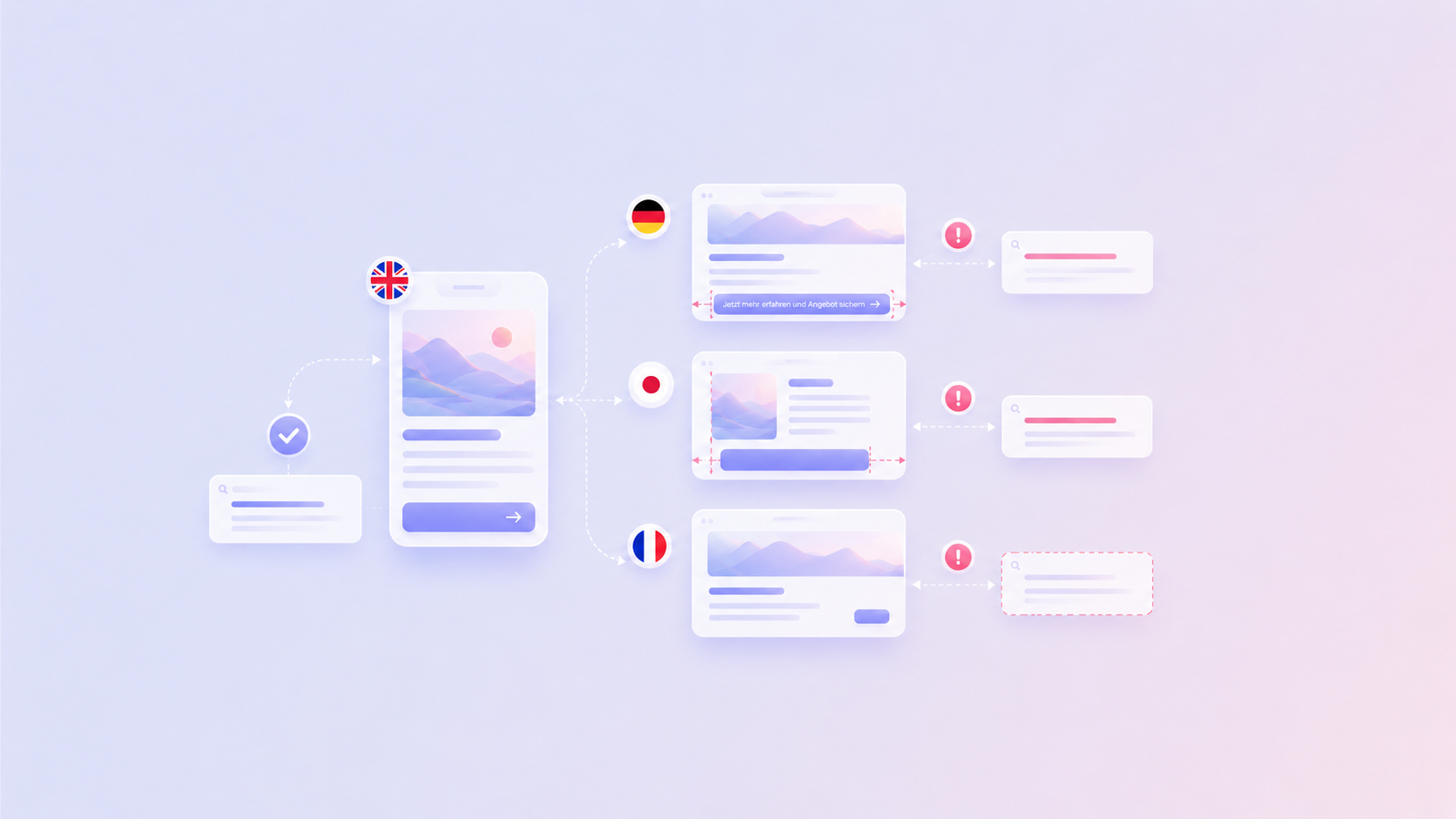
Table of content

i18n is what keeps multilingual websites and campaigns from breaking when English copy turns into longer German CTAs, Japanese navigation labels, Arabic right-to-left layouts, or market-specific legal text. I18n stands for “internationalization”: the process of preparing software, websites, and content systems so they can support multiple languages, regions, formats, and cultural expectations.
For enterprise teams, i18n affects practical launch details: whether translated CTAs still fit buttons, whether legal disclaimers can vary by market, whether localized metadata is editable, and whether regional reviewers can approve content before a campaign goes live.
A well-planned i18n setup helps teams move from manual translation coordination to a structured localization workflow. That means fewer overflowing buttons, fewer last-minute developer tickets, and fewer moments where a global launch gets delayed because a translated headline no longer fits the page.
i18n is the abbreviation for “internationalization”. The word starts with “i,” ends with “n,” and has 18 letters in between. In software and digital content, i18n means preparing a product, website, app, or content system so it can work across languages and locales. It covers how text is stored, how formats are displayed, how layouts behave, and how teams manage multilingual content over time.
For marketing and communications teams, i18n creates the technical readiness for localization. A campaign landing page, for example, is not ready for global rollout just because the English copy is approved. The page also needs translatable text, flexible layouts, localized metadata, region-specific legal copy, and correct formatting for dates, currencies, and numbers.
Practically, i18n means the source content becomes structured, reusable, and locale-ready content with keys, context, formatting rules, and review ownership.
Term | Goal | Example |
|---|---|---|
Internationalization | Is the system ready for multiple locales? | Can the website display German, Japanese, and Arabic correctly? |
Translation | What should the text say in another language? | “Start free trial” becomes the right local CTA |
Localization | Does the experience fit the market? | Tone, examples, pricing, legal text, and imagery are adapted |
Globalization | Can the business operate across markets? | Product, marketing, support, legal, and sales align globally |
Developers implementing these technical foundations can find a more detailed walkthrough in our internationalization (i18n) programming guide.
I18n, localization, translation, and globalization often appear in the same conversation, but they describe different layers of international growth.
Translation focuses on language. Localization adapts the full experience for a specific market. I18n prepares the technical and content infrastructure that allows both to happen reliably. Globalization is the wider business strategy that connects market expansion, operations, compliance, and customer experience.
The following table helps identify the issues with your content:
Problem | It is likely a… |
|---|---|
The translated wording sounds unnatural | Translation issue |
The wording is accurate but does not fit the market | Localization issue |
The translated text causes layout issues | I18n issue |
The system cannot support local pricing or region-specific pages | I18n or product architecture issue |
Teams cannot coordinate launches across markets | Globalization (workflow) issue |
For example, if a German CTA is too long for a button, the translation may be perfectly fine. The i18n problem is that the layout was designed too tightly around English. If a campaign reference makes sense in the United States but feels irrelevant in Spain, the issue sits closer to localization.
This distinction helps marketing teams brief developers, designers, translators, and regional reviewers more clearly. Instead of saying “the translation does not work,” teams can identify whether the issue is linguistic, cultural, technical, or operational.
Marketing and communications teams should care about i18n because every translated touchpoint shapes how customers experience the brand.
In enterprise organizations, text appears everywhere: on websites, in product interfaces, lifecycle emails, help centers, sales decks, campaign pages, legal notices, app store listings, and internal communications. Each of these touchpoints carries tone, intent, trust, and personality.
For global teams, the challenge is to keep that voice recognizable across markets while still sounding natural in every language. A translated campaign should not feel like an English message wearing a different language as a costume. It should sound as if it was written by someone who understands the market, the audience, and the brand.
I18n creates the foundation for that level of quality. When content is structured properly, teams can connect each text element with context, approved terminology, style guidance, review steps, and locale-specific formatting. This makes it easier to protect the key message while giving local teams enough room to make the wording feel native.
Consider a global product announcement. The central marketing team defines the message, regional teams adapt the tone, legal reviews sensitive claims, and product teams update in-app text. Without an i18n-ready setup, every asset becomes its own coordination task. With the right structure in place, teams can move faster without treating quality as the trade-off.
For LingoHub users, centralized translation management helps connect content, context, terminology, review, and publishing in one workflow. Teams should know which terms are fixed, which claims need legal review, which strings contain placeholders, and which pages are ready for publishing.
Enterprise teams should think about i18n before content moves into production, ideally during campaign planning, UX design, and development scoping. An effective localization strategy starts long before translation begins. An i18n-ready setup should define: translation keys, fallback locales, placeholder rules, pluralization handling, ICU message support, character limits, RTL behavior, localized metadata, and pseudo-localization testing before launch.
The earlier i18n is considered, the easier it is to avoid rework. If a website template, campaign page, or product flow is created only around English, every later locale inherits that limitation. Long German compounds can break fixed-width buttons, Arabic and Hebrew require bidirectional layout support, Japanese may need different line-breaking behavior, and date strings such as 07/08/2026 can be ambiguous without locale-aware formatting.
Marketing teams can support i18n early by defining what the international rollout needs to support. That does not require writing code. It requires giving technical teams the market, content, and workflow context they need.
Any user-facing or market-facing content element may need i18n. Obvious items include headlines, body copy, buttons, forms, navigation labels, and product descriptions. The less obvious items often cause more problems: SEO metadata, image alt text, error messages, confirmation emails, legal disclaimers, cookie banners, app store copy, PDF downloads, and text embedded inside images.
For enterprise marketing teams, this creates a practical need for a content inventory. Before translation begins, list every content element that a customer, prospect, partner, journalist, applicant, or internal stakeholder may see to assure you don’t miss a critical step in the customer journey.
Content type | Example | Common risk |
|---|---|---|
Website copy | Homepage, pricing page, solution pages | Missing strings or inconsistent CTA |
SEO metadata | Meta titles, descriptions, slugs | Translated pages underperform in search |
Forms | Labels, validation messages, dropdowns | Hardcoded fields or unclear local wording |
Emails | Product updates, onboarding alerts | Inconsistent tone or misplaced placeholders |
Legal notices | Privacy, consent, terms snippets | Regional compliance gaps |
Visual assets | Banners, screenshots, PDFs | Embedded text requires manual recreation |
Product UI | Navigation, tooltips, empty states | Layout issues or missing context |
Imagine your team creates a product campaign landing page in English and wants to launch localized versions for Germany, France, Japan, and Spain at the same time.
Without i18n, each market quickly runs into different issues:
The German CTA “Kostenlose Testversion starten” doesn’t fit the primary button anymore.
The Japanese version needs different line breaks because words don’t separate with spaces.
French legal disclaimers are significantly longer than the English version and push the page layout below the fold.
Product screenshots still contain English text that must be recreated manually.
Meta titles and descriptions remain in English, reducing visibility in local search results.
With an i18n-ready workflow, these problems are anticipated before translation begins. Text is externalized, layouts allow for expansion, screenshots are tracked as translatable assets, metadata is localized, and every language follows the same review and publishing process.
Without i18n | With i18n |
|---|---|
Fixed English layouts | Flexible layouts designed for text expansion |
English metadata | Localized titles, descriptions, and slugs |
Text embedded in images | Separate translatable assets |
Manual copy-paste | Connected localization workflow |
Launch delays | Parallel multilingual releases |
How to use i18n in enterprise marketing workflows?
To understand how to use i18n, start by treating multilingual content as structured content rather than finished copy locked inside one language.
In practice, this means user-facing text should be separated from code, design context should travel with the string, and translation should happen in a system that supports review, terminology, quality checks, and publishing. This gives marketing, development, and localization teams a shared workflow.
A typical i18n-ready workflow looks like this:
Marketing defines the source message, target markets, campaign claims, CTA intent, required legal variations, and terms that must stay consistent.
Developers externalize user-facing text into translation files or connected systems.
Designers validate that layouts can handle text expansion and different scripts.
Translators adapt the content with context, glossary terms, and style guidance.
Regional reviewers approve meaning, tone, and compliance.
QA checks verify placeholders, formatting, links, character limits, and consistency.
Localized content is published through connected tools.
For example, the subject line, preview text, body copy, CTA, placeholders, unsubscribe text, and tracking parameters in a lifecycle email all need localization. If those elements are managed structurally, the team can review and publish them with much less risk.
In LingoHub, this workflow can connect source files, CMS content, screenshots, glossary terms, translation memory, reviewer roles, and QA checks so teams can see not only the text, but also where it appears and what rules apply.
Teams should handle locale-specific formatting through locale-aware rules rather than manual text edits.
Dates, times, currencies, numbers, phone numbers, addresses, and measurements vary across regions. A format that looks natural in one market can confuse users in another. For example, “07/08/2026” can mean July 8 or August 7 depending on the locale.
Pricing is another common example. A value shown as “€1,000.50” in one format may need to appear as “1.000,50 €” in another. Manually changing these values inside copy creates avoidable risk, especially when prices, offers, or currencies change.
Find some more examples and respective solutions in the table below:
Content element | Recommended handling |
|---|---|
Dates and times | Use locale-aware formatting |
Numbers and decimals | Use locale-aware formatting |
Currencies | Use locale-aware formatting and market-specific pricing rules |
Phone numbers | Use regional formatting patterns |
Addresses | Support country-specific address structures |
Units of measurement | Define whether values need conversion or formatting |
Marketing teams should flag format-sensitive content early in the brief. If a campaign includes dates, discounts, currencies, local store information, or market-specific offers, development and localization teams need to know before translation begins.
Marketing teams should manage brand voice with shared terminology, style guidance, reviewer ownership, and clear rules for local adaptation.
A global brand voice should feel recognizable across markets, but it should not force every locale into the exact rhythm of the source language. Some markets need a more formal tone. Some need different CTA phrasing. Some legal or product claims may require more precision.
A multilingual style guide gives teams a practical way to protect brand consistency without flattening local nuance. It should be specific enough to guide decisions, but usable enough that translators and reviewers can apply it quickly.
Here’s an example of what a brand style guide could look like:
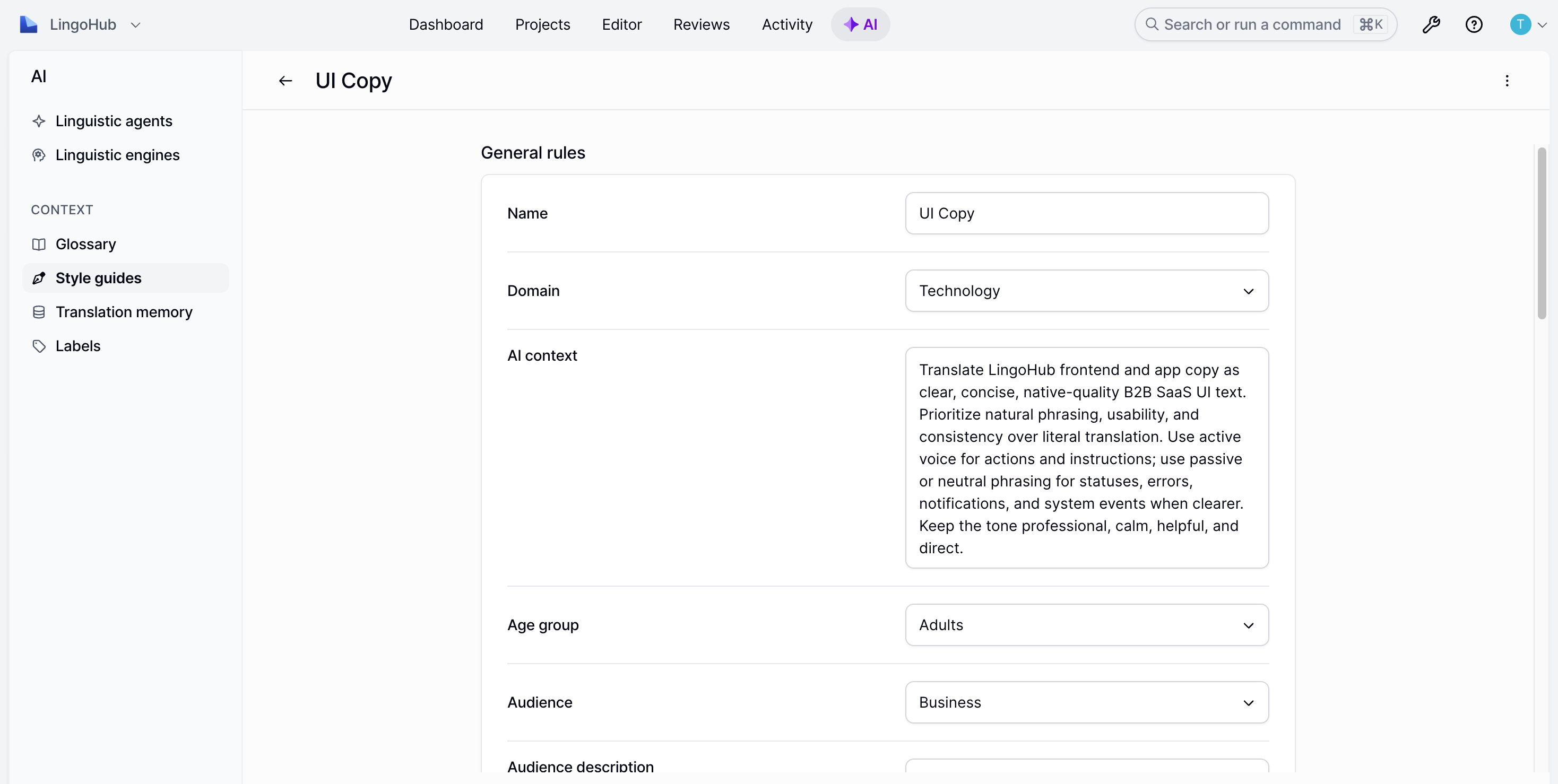
A glossary is equally important. It defines approved translations for product names, feature labels, industry terms, and do-not-translate words. In a platform like LingoHub, glossary and style guidance can be connected directly to translation workflows so teams do not need to chase terminology decisions across documents and chat threads.
The most common i18n mistakes in enterprise marketing are hardcoded copy, English-only layouts, missing context, untranslated metadata, and late regional review.
Hardcoded copy makes teams slower because every text change requires developer involvement. If campaign headlines, CTAs, or product messages are buried in code, marketing cannot update or localize them efficiently.
English-only layouts cause design issues after translation. German, Finnish, and French text can be longer than English. Japanese may be shorter. Arabic and Hebrew require right-to-left support. A button, navigation item, or pricing card that looks polished in English can quickly show spacing, wrapping, or alignment issues when real translations are added.
Missing context leads to weak translation decisions. A short string like “Open” can be a verb, an adjective, or a status label. Without screenshots, notes, or usage context, translators may choose the wrong meaning.
Untranslated metadata limits multilingual SEO. Meta titles, meta descriptions, image alt text, URLs, structured data, and hreflang setup all influence whether localized pages can perform in search.
Late regional review creates unnecessary rework. If local marketing or legal teams only see content shortly before launch, they may request changes that affect layout, messaging, compliance, or product claims. Involving them earlier keeps feedback more manageable.
Marketing and development teams can work together on i18n by defining ownership for content, structure, context, formatting, and quality.
Marketing owns the message, audience, tone, campaign goals, terminology, and regional business context. Development owns the technical setup, translation keys, locale handling, integrations, and release flow. Localization teams connect both sides through translation workflows, review, and quality assurance.
I18n supports multilingual SEO by making localized pages technically and structurally ready for search engines.
A page needs more than translated body copy to perform in another market. Search engines also need clear language signals, localized URLs, translated metadata, correct hreflang annotations, and consistent canonical structures. Localized SEO is not a word-for-word translation exercise. People in different markets often search using different terminology, even when they’re looking for the same product. Simply translating an English keyword can result in pages that sound unnatural or target search terms with little search demand.
Suppose LingoHub publishes an English page targeting the keyword translation management system. A literal German translation would be “Übersetzungsmanagementsystem”. While technically correct, German users may search for terms such as “TMS Software”, “Übersetzungssoftware”, or “Lokalisierungssoftware” instead.
Therefore, the German page should be optimized around local search behavior, not around a literal translation of the English keyword.
This also affects SERP framing. The English page might position the product as a “translation management system,” while the German page may perform better with a more practical angle such as “TMS Software für Entwicklungsteams” or “Lokalisierungssoftware für Softwareteams.”
English page | German page |
|---|---|
Translation management system | TMS Software |
|
|
Start free trial | Kostenlos testen |
The following table gives an idea of what an i18n-ready SEO setup could look like:
SEO element | I18n requirement |
|---|---|
URL structure | Locale-specific paths or domains |
Hreflang | Correct language and region signals |
Meta titles | Translatable and locally optimized |
Meta descriptions | Translatable and locally optimized |
Slugs | Localized where appropriate |
Image alt text | Translatable and descriptive |
Structured data | Supports localized fields |
Canonicals | Prevent duplicate content confusion |
For multilingual SEO, treat every localized page as its own search asset. That means validating local search intent, keyword demand, metadata, internal links, and URL structure for each market instead of translating the English page one-to-one.
Getting started with i18n is easier when localization becomes an ongoing workflow instead of a file handoff at the end of a project. LingoHub helps enterprise teams connect content, context, terminology, translation, review, and quality control in one place. Marketing and communications teams can manage multilingual content with glossaries, style guides, translation memory, review steps, and QA checks, while developers keep repositories, CMS content, and product text connected to the localization process.
LINA, LingoHub’s AI-powered assistant, always works with the context available in your localization workflow, including glossary, style guide, translation memory, project context, and existing translations. Depending on how much autonomy a team wants to give her, LINA can support the process as an assistant, translator, or agent.
As an assistant, LINA helps directly in the editor with translating, shortening, rephrasing, and variant suggestions, while humans stay in control of the final approval. As a translator, LINA can take on more of the translation work while still following the same context, terminology, and style guidance. As an agent, LINA can support even more autonomous workflows.
Start your free trial or book a demo to see how LingoHub and LINA support translation, review, and quality control.
I18n stands for internationalization. It means preparing software, websites, apps, and content systems so they can support multiple languages, regions, formats, and cultural expectations.
Use i18n by making content structured, translatable, and connected to a localization workflow. That usually means externalizing user-facing text, defining translation keys, adding context, using glossaries and style guides, supporting locale-specific formats, and running QA before publishing.
For a new marketing website, i18n can often be planned during the CMS and template setup. For an existing enterprise site, the timeline depends on how much copy is hardcoded, how many systems contain translatable content, and whether metadata, emails, PDFs, and product strings are included in scope.
No. Developers usually implement the technical foundation, but marketing, communications, design, localization, legal, and regional teams all influence i18n success. Enterprise i18n works best when teams define content, context, terminology, formatting, review, and publishing together.

5 best translation management systems for software in 2026
Compare the 5 best translation management systems for software localization in 2026, including LingoHub, Phrase, Lokalise, Crowdin, and Transifex.

AI localization: Supercharge your translation workflow
AI localization uses artificial intelligence to streamline translation workflows, improve quality, and scale global content faster. Learn more in our blog.

Approaching lean translation management for localization
Discover the lean translation management process. Learn how it ensures agility, speed, and cost savings to optimize your workflows.
