Localization workflows & operations
Best glossary and style guide tools for AI translation
Localization workflows & operations

Table of content

Your product calls it a “workspace”. Your German glossary says “Arbeitsbereich”. But somewhere along the way, AI translates it as “Arbeitsplatz”.
Now your app, onboarding emails, and help center use three different terms for the same feature. Customers get confused, and your team has to track down the inconsistencies.
A translation glossary is supposed to prevent exactly that. But giving AI a list of approved terms doesn’t guarantee it will follow them every time. What matters is whether your translation tool can detect terminology mistakes and correct them before they reach your customers.
We compared 12 AI translation tools to see how they handle glossaries, check translations for terminology errors, and deal with terms that don’t match your rules. Here’s what sets them apart.
Imagine you’ve spent weeks building a glossary. Every product feature has an approved name, your brand terminology is documented, and translators know exactly which expressions to avoid.
Then you start using AI translation. Most translations look good, but every so often, an approved term gets replaced with a synonym. The meaning is still understandable, but your terminology is no longer consistent.
This is where glossary enforcement comes in.
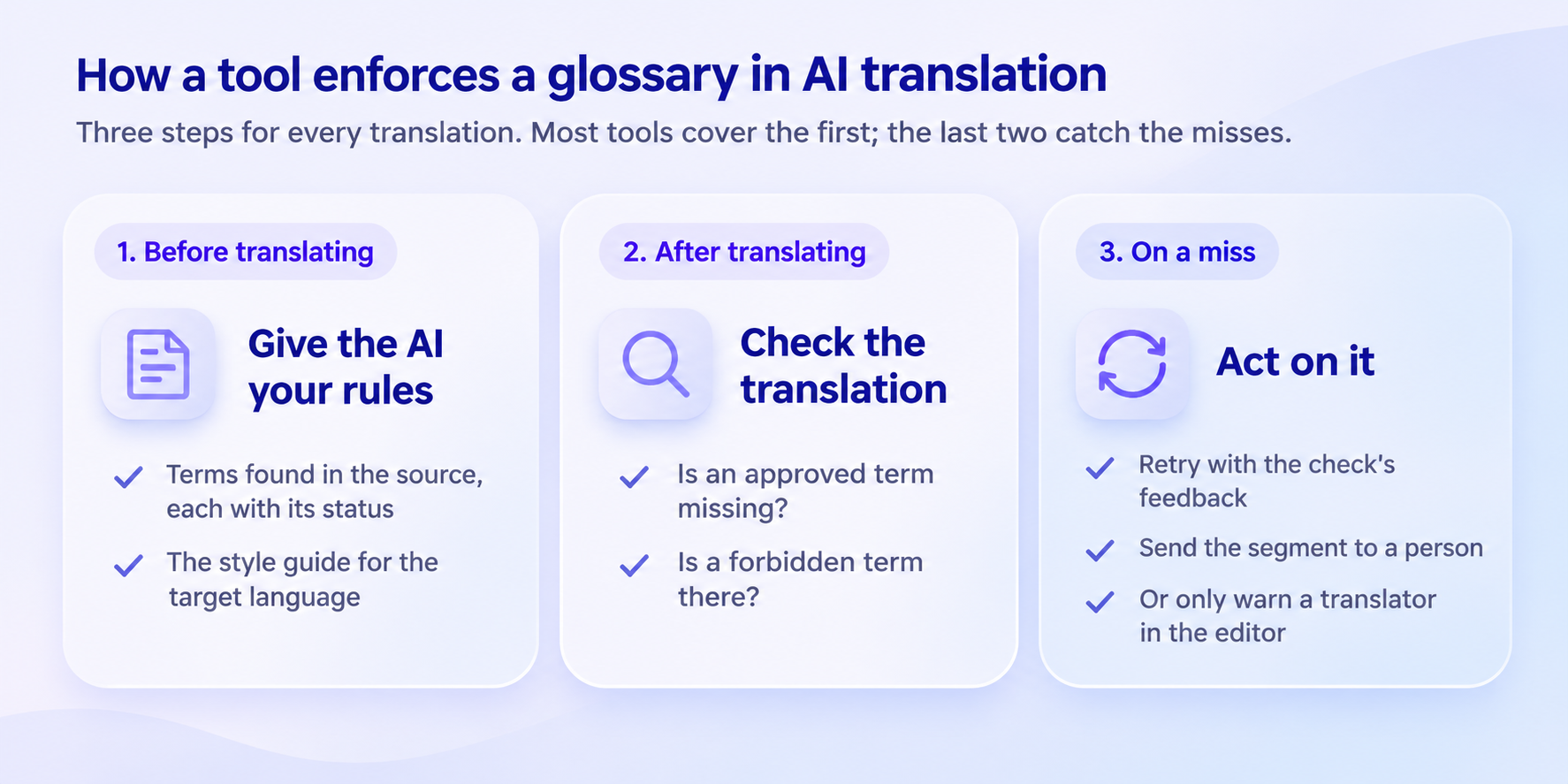
A tool that enforces your glossary does more than provide terminology to an AI model. It follows three steps:
Before translating: The AI receives relevant glossary terms, their usage rules, and the style guide for the target language.
After translating: Quality checks look for missing approved terms or terminology that shouldn’t have been used.
When something goes wrong: The tool either retries the translation, flags it for human review, or warns a translator.
Most tools are good at the first step. Giving an AI model a glossary can already produce impressive results.
In the WMT25 terminology task, strong translation systems used more than 97% of the required terms correctly when translating individual sentences from IT documentation. However, in the document-level task involving financial texts translated from English into Traditional Chinese, terminology accuracy dropped to approximately 70-80%.
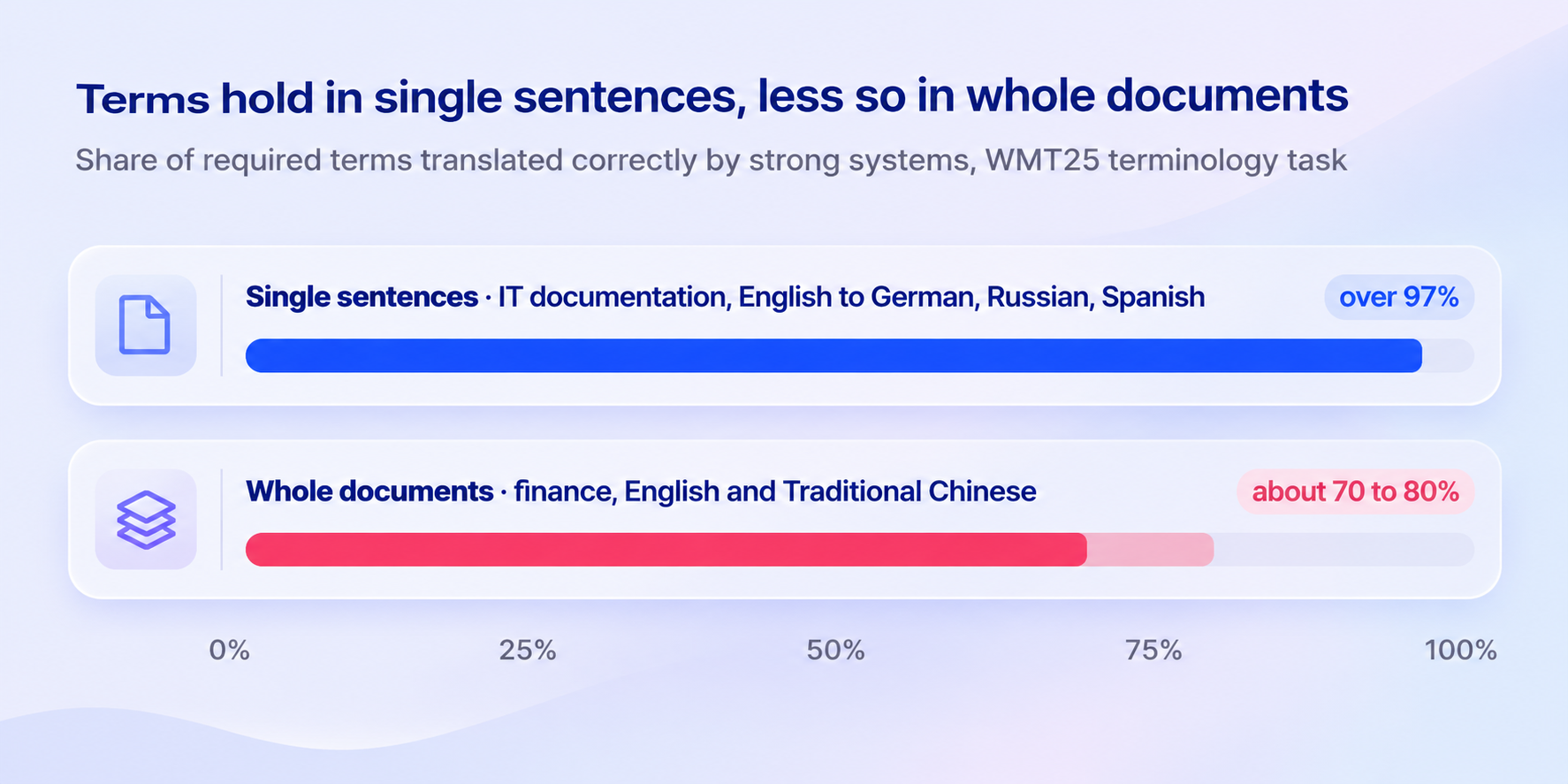
The difference matters. Following a glossary for one sentence is relatively straightforward. Maintaining consistent terminology across thousands of strings, multiple languages, and frequent product releases is a different challenge.
That’s why the real difference between AI translation tools isn’t simply whether they support glossaries, but what happens when the AI doesn’t follow them.
Nearly every tool in this comparison can provide terminology to an AI translation engine. But their approaches to checking translations and handling mistakes vary considerably.
Some tools highlight terminology problems for translators. Others prevent a translation from being saved or automatically attempt to correct it.
The table below compares how each platform handles these steps and what you’ll pay for the relevant features.
Tool | What the AI gets before translating | Term check on the translation | When a term is missing | Lowest listed price with these features |
|---|---|---|---|---|
LingoHub | Glossary and style guide, set per LINA, plus translation memory | Terms missing, Terms not recommended | Agent role: LINA retranslates a segment that fails a quality check up to 3 times with feedback, then marks it “Blocked”. Translator role: a person approves | €209/month billed yearly |
Lokalise | Glossary and style guide | AI LQA | Not documented for AI output | Glossary from $379/month, style guide from $1,049/month, billed yearly |
Phrase | Preferred and forbidden terms, style guides | Term base usage (Phrase Strings) | Moderate (default) lists it; Strict blocks saving in the editor | $525/month billed annually (Software UI/UX) |
Crowdin | Glossary terms and style guides in the AI prompt | Consistent terminology | Warning or error, your choice per check | See Crowdin’s pricing page |
Smartling | Glossary terms and do-not-translate notes | Glossary Compliance, Blocklisted terms (both off by default) | Depends on the severity you set | No public price |
Locize | Glossary, style guide and translation memory (AI only, not plain machine translation) | Every AI result, before it’s stored | One retry with the terms named, then stored and marked for review | $49/month (Growth) |
Transifex | Glossary as context, AI style guide | Glossary warning or error for translators | Not documented for AI output | Contact sales |
Smartcat | Glossary terms and forbidden terms | Glossary term check | A correction step for non-LLM engines; LLM engines skip it | From $1,200/year (Adapt) |
Lilt | The termbase | Missing terms highlighted in Verify | Not documented beyond the highlight | No published price |
XTM Cloud | Not documented for AI translation | Forbidden term status | Not documented | Included AI words from $60,000/year (Business) |
memoQ | Term base matches, formality setting | Forbidden term warning | A warning | memoQ TMS from €2,750/year (Starter) |
Trados | Terms with status, in prompts you write (Studio) | Not documented | Not documented | No price shown for business plans |
A glossary alone doesn’t tell you how reliably a platform maintains terminology. To understand the differences, it’s worth looking at how each tool works in practice.
Disclaimer: This comparison is based on publicly available information as of November 11, 2026. Features, pricing, and plan details may change at any time without notice. Actual offerings may vary depending on subscriptions, add-ons, or individual agreements. Please refer to each provider’s official website for the most up-to-date information.
The right choice depends on what you’re translating and how your team works.
A software company shipping new strings every week may need automated checks and corrections. A translation agency might prefer detailed terminology warnings that human translators can resolve themselves.
Let’s look at where each platform fits.
Best for: Product and software teams that sync strings from GitHub, GitLab, Bitbucket, Figma, or a CMS and want AI translations that follow their terminology and style rules.
In LingoHub, your glossary is more than a list of translations. It becomes part of the context that LINA, the AI inside LingoHub, uses to translate your content.
LINA works with your glossary, translation memory, and style guide to understand which terminology to use and how translations should sound.
For each glossary term, you can define translations and add alternatives. Alternatives can be marked as Admitted when they’re acceptable or Not recommended when they should be avoided. You can also define terms that must remain untranslated.
The style guide adds another layer of context, covering audience, formality, grammatical person, and brand voice for each target language.
But providing context is only half the process.
With LingoHub’s quality checks, you can detect missing glossary terms and expressions marked as “Not recommended”.
What happens next depends on LINA’s role:
LINA Translator: Translates content and runs quality checks, leaving approval to a human reviewer.
LINA Agent: Translates, checks, and approves content automatically when the checks pass. If a segment fails, LINA retries up to three times using feedback from previous attempts. If the issue remains unresolved, the segment is marked Blocked for your team to review.
This means terminology issues can be detected and addressed within the translation workflow instead of being discovered after release.
Best for: Teams already using Lokalise to manage app and website translations.
Lokalise AI can use a project’s glossary and an attached style guide as translation context. Terms can be marked as forbidden, non-translatable, or case-sensitive, helping the AI understand which expressions to use.
The platform also offers AI linguistic quality assurance (LQA).
However, the documentation doesn’t clearly explain what happens when AI-generated translations fail to follow glossary terminology.
Best for: Larger teams managing both software localization and document translation.
Phrase provides terminology management through term bases containing preferred and forbidden terms. Its AI Translation Agent can use these terms alongside style guides.
For teams working in Phrase Strings, terminology checks can also help prevent mistakes from reaching production. The default “Moderate” setting lists terminology issues, while “Strict mode” prevents translators from saving translations that violate the rules.
There’s an important distinction, though. Phrase’s documentation describes adherence to style rules as probabilistic, meaning the AI won’t necessarily follow every instruction. “Phrase Portal” also doesn’t apply style guide content through its AI Translation Agent.
Best for: Open-source projects and software teams that want glossary-aware AI translation.
Crowdin can include glossary terms and style guides in the prompts sent to AI translation engines.
After translation, its Consistent terminology check identifies missing glossary terms and expressions marked as not recommended or obsolete.
Teams can configure many quality checks as warnings or errors. However, Crowdin’s AI-powered check always produces a warning.
This makes it useful for identifying terminology problems, although the documented workflow doesn’t establish automatic correction for every issue.
Best for: Enterprise localization teams managing websites, applications, and documents.
Smartling provides several ways to improve terminology consistency.
Glossary terms and do-not-translate instructions can be passed to the AI before translation. Its term insertion features can also introduce approved terminology into machine translations.
For languages where grammar changes the form of a word, AI-enhanced term insertion can adapt terminology to fit the sentence.
Smartling also offers “Glossary Compliance” and “Blocklisted terms” checks. Both are disabled by default, so teams need to activate them.
One limitation is that AI-enhanced term insertion is available in translation workflows and Smartling Translate, but not through its machine translation API.
Best for: Developer teams using i18next for application localization.
Locize combines glossary terms, translation memory, and style guides when generating AI translations.
The interesting part is what happens afterward.
Before storing an AI-generated translation, Locize checks whether required terminology is missing or forbidden terms have been used. If it detects an issue, the AI gets another attempt with the relevant terminology explicitly included.
If that second attempt still fails, the translation is stored and marked for review.
However, glossary context applies to AI translation rather than plain machine translation.
Best for: Teams already using Transifex for software localization.
Transifex, now sold as part of XTM, provides glossary context for AI translation and supports AI style guides covering formality, gender, capitalization, and language-specific rules.
Its glossary checks can display warnings or errors when translators save their work.
What’s less clear is whether those same checks automatically evaluate AI-generated translations. The available documentation doesn’t explicitly confirm this.
Best for: Companies that want to combine AI translation with access to professional linguists.
Smartcat includes glossary terms and forbidden terminology in its AI prompts. An automated check then looks for glossary-related translation mistakes.
The platform also offers a terminology correction step, but there’s an important limitation: this correction process applies to non-LLM translation engines.
LLM-based engines skip that step.
Additionally, when Smartcat inserts an approved translation memory match, it doesn’t apply glossary terminology to that match.
Best for: Enterprises combining AI translation technology with professional translation services.
Lilt’s AI translation system uses terminology from its termbase to guide translation.
When a required term is missing, the “Verify” feature can highlight the issue for review.
However, Lilt acknowledges that its AI may sometimes omit a glossary term when translation memory examples suggest different terminology.
Another limitation concerns longer entries: glossary terms exceeding 60 characters aren’t recognized in the editor.
Best for: Enterprise localization teams with established terminology management processes.
XTM Cloud allows terminologists to define forbidden terms, helping translators identify terminology that shouldn’t appear in their work.
However, its terminology documentation describes terminology and machine translation as separate engines that don’t work together.
This makes it difficult to establish how glossary terminology is enforced during AI translation based on the available documentation.
Best for: Translation agencies and language service providers working with professional translators.
memoQ’s AI-based translation feature, AGT, receives relevant term base matches for each segment.
This gives the translation engine access to terminology already maintained by the team.
The platform also supports formality settings and can warn translators when forbidden terminology appears.
However, its AGT documentation doesn’t describe a dedicated style guide feature, and terminology violations are handled through warnings rather than a documented automatic correction process.
Best for: Professional translators and agencies using Trados Studio.
Trados Studio 2026 supports AI translation through prompts that can include terminology and usage statuses.
This gives experienced users flexibility in defining how an AI model should handle terminology.
The trade-off is that style instructions need to be included in prompts created by the user, rather than being managed through a dedicated AI style guide workflow.
Another consideration is platform compatibility: Trados Studio isn’t officially supported on macOS.
Even with the right glossary, terminology consistency isn’t always straightforward.
Consider the German word Konto, meaning account.
Depending on the sentence, it might appear as Kontos in the genitive case or Konten in the plural.
If a translation tool insists on using Konto exactly as written, it can produce grammatically incorrect translations. But if its terminology checker only looks for that exact word, it might also flag perfectly correct variations as mistakes.
This becomes particularly challenging in languages with complex grammatical structures.
In a 2021 study of English-to-Czech machine translation, 46% of errors produced by a baseline model that was forced to insert terminology were related to grammatical agreement.
Different tools approach this problem in different ways.
Smartling can adapt inserted terminology to the surrounding sentence. Phrase allows users to identify the part of a term that should remain unchanged. Lilt acknowledges that its AI sometimes uses inflected forms.
LingoHub offers several glossary matching options, allowing teams to decide how terms should be recognized:
Automatic: Recognizes common inflected forms, including plurals, cases, and tenses, depending on the language. For example, invoice also matches invoices, but not unrelated synonyms such as bill.
Fuzzy: Matches word stems, although some irregular forms and language-specific plurals may not be recognized.
Prefix: Matches terms based on their beginnings, such as log in login.
Exact: Recognizes only the exact term, without variations.
Custom: Uses wildcard patterns for more specific matching rules.
You can also configure case sensitivity when using manual matching settings.
Automatic matching is particularly useful for languages where words change depending on their grammatical role. Instead of maintaining separate glossary entries for every possible variation, the system can recognize common inflected forms.
Still, no matching method is perfect for every language or use case.
When testing a translation tool, include examples with plurals, grammatical cases, and other word variations. That way, you can see whether it recognizes correct terminology without generating unnecessary warnings.
A feature comparison can tell you what a translation platform promises. But the best way to find out whether its glossary enforcement works for your team is to test it with your own content.
You don’t need a large translation project to get useful results. A small, carefully selected test can reveal how reliably a tool follows terminology rules.
Here’s a practical approach:
Choose 20 glossary terms. Include product names, five terms you don’t recommend, and three expressions that must remain untranslated.
Select 50 real strings. Mix short UI labels, strings containing placeholders, and at least one longer help center paragraph.
Translate into two languages. Ideally, include a language with grammatical inflections, such as German or Polish.
Check the terminology. Count how often approved terms appear correctly, whether unwanted alternatives are avoided, and what happens when the AI makes a mistake.
Review the tone. Look at ten translations and check whether they follow your style guide, including formality and grammatical person.
Pay particular attention to what happens when a translation fails a terminology check.
Does the platform automatically try again? Does it flag the segment for review? Or does the translation simply remain unchanged until someone notices?
These differences might seem small during a trial. But when your team translates thousands of strings across several languages, they can have a significant impact on how much manual review is needed.
The goal isn’t to find a tool that never makes a terminology mistake. It’s to find one that helps your team catch and resolve those mistakes before release.
The 12 platforms above aren’t the only options for managing translation terminology.
Depending on your content and workflow, these alternatives may also be worth exploring:
Tolgee: An open-source localization platform with glossary functionality available on advanced plans.
Weglot: Focuses on website translation and supports glossary rules such as “always translate” and “never translate”.
Lionbridge and TransPerfect: Language service providers offering translation as a service rather than primarily serving as self-managed translation platforms.
These solutions serve somewhat different needs, which is why they aren’t included in the main comparison.
An AI glossary is a collection of approved terminology, translations, and usage rules that helps an AI translation system use consistent language.
It can define preferred expressions, acceptable alternatives, terms to avoid, and words that shouldn’t be translated.
The most useful AI glossary tools go beyond providing terminology as context. They also check generated translations to identify terms that don’t follow the glossary.
Yes. If you include glossary terms in a prompt, ChatGPT or Gemini can use them when generating translations.
However, manually providing terminology in a chat doesn’t create a shared glossary management process for your team. It also doesn’t automatically track terminology violations across thousands of strings.
A translation management system such as LingoHub connects glossary terminology, style guides, and quality checks to an ongoing translation workflow.
LINA can use different AI engines, including models from OpenAI, Google, and Anthropic, while applying the context and quality rules configured for your translations.
Start with terminology that appears frequently or needs to remain consistent.
Product names, feature labels, navigation elements, technical terminology, and legal expressions are good candidates.
For each term, define its translation and any relevant usage rules. You can also document acceptable alternatives, expressions to avoid, and terms that must remain untranslated.
In LingoHub, you can import glossary entries using a CSV file and export your terminology as CSV or TBX.
Once your glossary is in place, connect it to your translation workflow and enable the relevant quality checks.
Ready to see how glossary enforcement works in practice?
Start your free 14-day trial or book a demo with our experts to explore how LingoHub fits your workflow.

5 best translation management systems for software in 2026
Compare the 5 best translation management systems for software localization in 2026, including LingoHub, Phrase, Lokalise, Crowdin, and Transifex.

What is linguistic quality assurance (LQA)?
LQA (linguistic quality assurance) checks translations for accuracy, terminology, and tone before release. See error types and how a score is worked out.

Marketing localization: keep one brand voice in every market
Marketing localization adapts campaigns, copy and visuals to each market. Build a localized marketing strategy in five steps and keep one brand voice.
